If your pages are indexed and Search Console outputs zero impressions, and your site is younger than about six weeks, nothing is broken. You are watching the normal gap between two different decisions Google makes at two different times. The waiting is real, it is unpleasant, and it is not evidence of a mistake.
There is a line where that stops being true. This post is about where the line sits, and the four checks that tell you which side of it you are on — before you spend money trying to fix a problem you may not have.
Indexed and ranked are two different decisions
Being indexed means Google stored your page. Getting an impression means Google chose your page for somebody's query, out of everything else it stored.
Those are separate systems making separate judgements, and the second one is far harder to earn than the first. A page can be flawlessly indexed and never chosen, indefinitely, without anything being wrong with it. It just has no query where it is among the best answers Google holds.
This is the distinction that makes the Search Console screen readable. "Indexed" is a filing decision. "Impressions" is a competitive one. Most people read a flatline as a filing failure and go looking for a technical bug, when what they are actually looking at is the ordinary result of being new.
The four checks that separate normal from broken
Run these in order. The first one that fails is your answer, and you can stop.
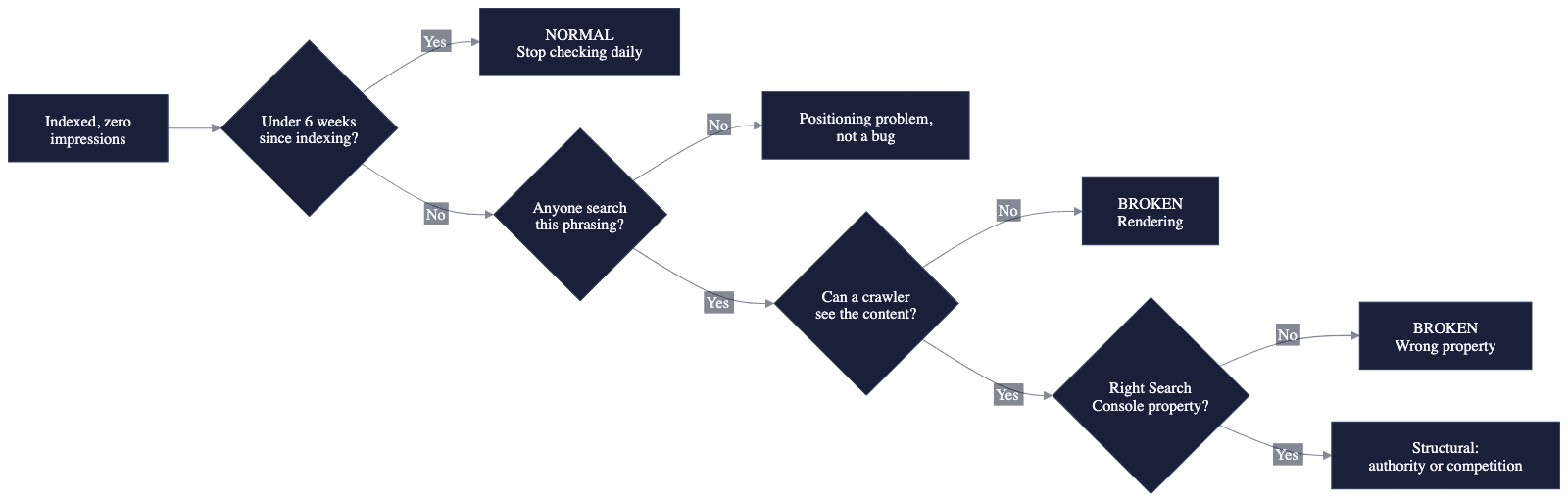
Check 1 — How old is the page, really?
Count from the date the page was first indexed, not from when you published it or bought the domain. Search Console's URL Inspection tool gives you this under "Coverage".
Practitioner guidance puts first impressions roughly two to six weeks after indexing, and treats zero impressions after 45 to 60 days as the point where something structural is worth investigating (MasterSEOTool, June 2026) BORROWED — this is somebody else's field observation, not a measurement of ours.
Google's own long-standing framing is looser still: four months to a year before SEO work shows meaningful results. Worth knowing that this number traces back to a Maile Ohye video from 2017 and gets re-cited as current guidance in posts published this year.
If you are inside that window, you are in the normal case. Skip to the last section, which is about what to measure while you wait.
Check 2 — Does anyone search for what this page answers?
A page about something nobody asks about will sit indexed and impression-free forever, and no amount of technical work will change that. This is the most common real cause after simple newness, and it is the one people least want to hear.
Test it cheaply: type your page's target phrasing into Search Console's Performance output with the query filter, over the last three months, across your whole site. Zero impressions for that phrasing anywhere on your site means either nobody is searching it, or you are nowhere near the pages that get shown for it.
Then search the phrase yourself, logged out. If the results are all large publishers and established vendors, you have found your answer — and it is a positioning problem, not a bug.
Check 3 — Can a crawler actually see your content?
This is the check almost nobody runs, and it is the one that catches genuine breakage on sites built with AI tools and no-code builders.
If your page renders its content with JavaScript in the browser, a crawler that does not execute JavaScript sees an essentially empty page. Lighthouse and PageSpeed will not reveal this, because both execute JavaScript when they test. A site can score well on every tool you own and still be blank to the systems you need.
This is the failure mode that catches sites built with AI tools most often, and it has its own sixty-second check. The short version:
curl -A "Mozilla/5.0 (compatible; Googlebot/2.1; +http://www.google.com/bot.html)" \
  https://yoursite.com/your-page | head -100
Read what comes back. If your headline, body text and links are not in that response, they do not reliably exist for anything that does not run JavaScript. A builder-forum thread from August 2026 documents exactly this on a live clinic site — every crawler tested saw a page with no headline, almost no text and no links, while the dashboards stayed green (Bubble forum).
Check 4 — Are you looking at the right property?
Search Console properties are exact. A domain property covers everything; a URL-prefix property covers only that exact scheme and host. If you verified https://example.com and your site actually serves https://www.example.com, your outputs will be truthfully, permanently empty while the site does fine.
Check the property type at the top of Search Console and compare it, character for character, against the URL your site actually resolves to after redirects.
We shipped this bug twice in one day
We are Unifounder, a platform where AI tools do real startup execution work for solo founders. We are also, this week, a worked example of the failure this post describes.
We shipped our own blog twice on 18 August 2026. Both times it deployed successfully, the listing page rendered, the RSS feed served, the structured data validated — and the site had zero posts on it. PROVEN, and both are in our public commit history.
The first failure: the blog read its markdown files from disk at request time, and those files never reached the deployed serverless function. The code caught the error and returned an empty list, so the page rendered a perfectly healthy "No posts yet."
The second failure, four hours later: our deployment ignore file contained a rule excluding every markdown file. The blog's posts are markdown. They were stripped out before the build even ran. Every local build was flawless throughout, because on a laptop the files are simply there.
Two different mechanisms. One identical symptom. A blog that looked completely fine and contained nothing.
The lesson we took from it is the one worth passing on: "no content" and "content never arrived" must not look the same to you. Our build now fails loudly rather than publishing an empty blog — because a silent failure that renders as a plausible empty state is the hardest kind to find, and we lost most of a day to exactly that.
If you built your site with an AI tool and you have never run Check 3, run Check 3.
What to measure while you wait
If Checks 1 through 4 all come back clean, you are in the normal case, and the honest position is that impressions are not yet a readable signal for you. Most published advice will tell you to watch bounce rate, time on page and click-through rate. At ten sessions a week those are noise, and reading them will mislead you more than measuring nothing.
Four things are readable at low volume — and we go through each of them properly here:
| What to watch | Where | What good looks like |
|---|---|---|
| Pages indexed vs. submitted | Search Console → Pages | The gap closing over weeks |
| Crawl frequency | Search Console → Settings → Crawl stats | Google returning at all, and more often over time |
| Query coverage | Performance → Queries, no filter | The count of distinct queries you appear for, even at position 60 |
| Crawler-visible content | The curl command above | Your actual text present in the response |
One caveat on all four: they are only worth reading if the tracking producing them is genuinely recording. That is a ten-minute check of its own, and it is worth running first.
Query coverage is the one to watch most closely. Appearing for three distinct queries at position 70 is meaningfully better than appearing for none, and it moves months before clicks do. It is the earliest honest evidence that Google understands what your pages are about.
That is the whole answer: check the four things, and if they pass, stop reading the impressions chart daily. It is not telling you anything yet, and treating a flatline as a verdict on your work is how people quit two weeks before their first click.
Building a company on your own and unsure whether any of your marketing is actually working? That uncertainty is the problem Unifounder exists to remove.