
Installing analytics and having analytics are different things, and the gap between them is invisible by design. A broken tracking setup does not throw an error, does not show a warning, and does not look any different from a quiet week.
In August 2026 we audited our own site and found three separate failures in forty-eight hours. Every one of them was silent. Here is what each looked like, and the ten-minute check that catches all three.
The check, first
Do this now, on the page that matters most to you. It needs a real browser — not a preview tool, not an incognito automation, an actual browser you are sitting in front of.
- Open your analytics tool's live or realtime view in one tab.
- Open your site in another tab, having arrived from outside — type the URL fresh rather than reloading an open tab.
- Watch the live view. Your visit should appear within seconds.
- Click your main call to action. That event should appear too.
- Complete whatever the page asks for — submit the form, join the list. Watch for the conversion.
- Go and find the record afterwards. Not the event count: the actual row, in whatever system is supposed to hold it. Then delete your test record.
Six steps. If all six produce something visible, your tracking works — for that path, in that browser, today. If any step produces nothing, you have found a real problem, and it has probably been running for as long as the tracking has.
The three failures we found on ourselves
We are Unifounder, a platform where AI tools do real startup execution work for solo founders. All three of these are PROVEN — they happened to us, on 2026-08-17 and 2026-08-18.
Failure 1 — There was no analytics at all
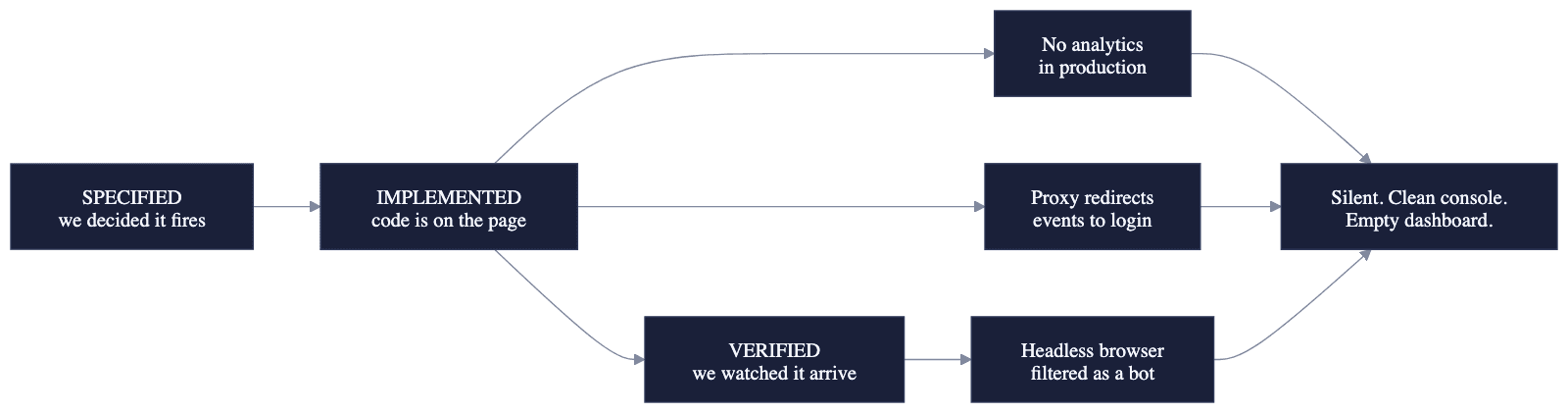
We scanned 1.22 MB of JavaScript on our production site and found no analytics of any vendor. Not a broken installation. Nothing at all.
This is more common than it sounds, and it has a specific cause: analytics gets installed on a staging or preview environment during development, works perfectly there, and never makes it into the production configuration. Everyone remembers installing it. Nobody checks the environment that matters.
The check that catches it: open your live site, view source, and search for your analytics provider's name. If it is not in the production HTML, it is not running in production, whatever your memory says.
Failure 2 — Every event was redirected to a login page
Our tracking library sent its events to a path on our own domain. Our authentication middleware intercepted every request to an unrecognised path and redirected it to /login.
So every single event left the browser, hit our own server, got a redirect, and quietly disappeared. The library reported no error. The console was clean. The tracking snippet was present in the page, exactly as it should be. The dashboard was empty, and looked simply like nobody had visited.
The check that catches it: open your browser's network tab, filter for requests to your analytics endpoint, and look at the status codes. You want 200s. A 302 or 307 means the request is being sent somewhere else. A 401 or 403 means it is being refused.
Failure 3 — Our verification tool was itself invisible
This one is the most instructive, because it happened while we were checking the fix for the other two.
We verified the installation using an automated headless browser. It reported zero events. We spent time investigating a failure that did not exist — because analytics tools deliberately filter out automated browsers. Ours identified the headless browser as a bot and silently discarded everything it sent. The capture function returned without error, the library initialised normally, the console stayed clean.
Zero events, and a perfectly working installation.
The rule we took from it: verify analytics with a real browser, always. And never "fix" a bot filter by disabling it — that just lets bot traffic into the baseline you are trying to make trustworthy.
What people describe, and what it usually is
These are real, from public forums:
"GA4 tracking code disappeared from a client website for 2 weeks. How do you monitor this?" — r/SEO, August 2026
"72% are labeled as 'Unassigned' in GA4 — I honestly have no idea where they are coming from" — Indie Hackers, June 2026
"The ad platform's ai output generator takes credit for everything. How do you actually know where customers came from?" — r/smallbusiness, August 2026
The shape is identical every time: a number exists, and nobody can tell whether it means anything. That is not an analytics problem you fix by buying a better tool. It is a verification problem, and the ten-minute check above is the whole fix.
Three words worth keeping separate
Once you start checking, you need vocabulary for what you find. We use three, and never treat them as interchangeable:
| Status | Means |
|---|---|
| SPECIFIED | We decided this event should exist and wrote down when it fires |
| IMPLEMENTED | The code to send it exists on the live site |
| VERIFIED | We performed the action and watched the event arrive, exactly once |
Almost everyone treats IMPLEMENTED as finished. All three of our failures were fully implemented. Only the third column is evidence, and it is the only one that costs you ten minutes to earn.
Write the status next to each event you care about. The honest list is usually shorter than expected, and knowing which of your numbers are real is worth more than having more numbers.
What this does not fix
If your tracking checks out and your dashboard still shows almost nothing, the tracking is not your problem — you have a traffic problem, and those are read completely differently at low volume. Most metrics are noise below about a hundred sessions, and reading them anyway will mislead you more than measuring nothing.
And if the concern is that search engines cannot see your pages at all, that is its own check — a different failure with a different sixty-second test.
Building alone and unsure whether any of your numbers mean anything? That uncertainty is the problem Unifounder exists to remove.