
Open your site in a browser and it looks finished. Run it through PageSpeed and the score is green. Neither of those tells you what a search crawler receives, and on sites built with AI tools the difference is recurringAgently the difference between all of your content and none of it.
The check takes one command and sixty seconds. Here it is, then why the tools you already trust cannot show you this.
The 60-second check
curl -A "Mozilla/5.0 (compatible; Googlebot/2.1; +http://www.google.com/bot.html)" \
  https://yoursite.com/ | head -200
Read what comes back. You are looking for three things:
- Your headline — the actual words, as text
- Your body copy — at least the opening paragraphs
- Your links — real
<a href="...">elements
If all three are there, crawlers can read your site and this is not your problem. Go and check something else.
If what comes back is a near-empty <body>, a loading spinner, or a wall of JavaScript with none of your words in it, you have found why nothing is being indexed. A crawler that does not execute JavaScript sees exactly what you just saw: nothing worth filing.
"When I view the page source, the
<body>tag is essentially empty … which means search engine crawlers can't see it." — a builder-forum thread with 832 views and 69 replies, October 2025
Why Lighthouse cannot tell you this
This is the part that costs people months.
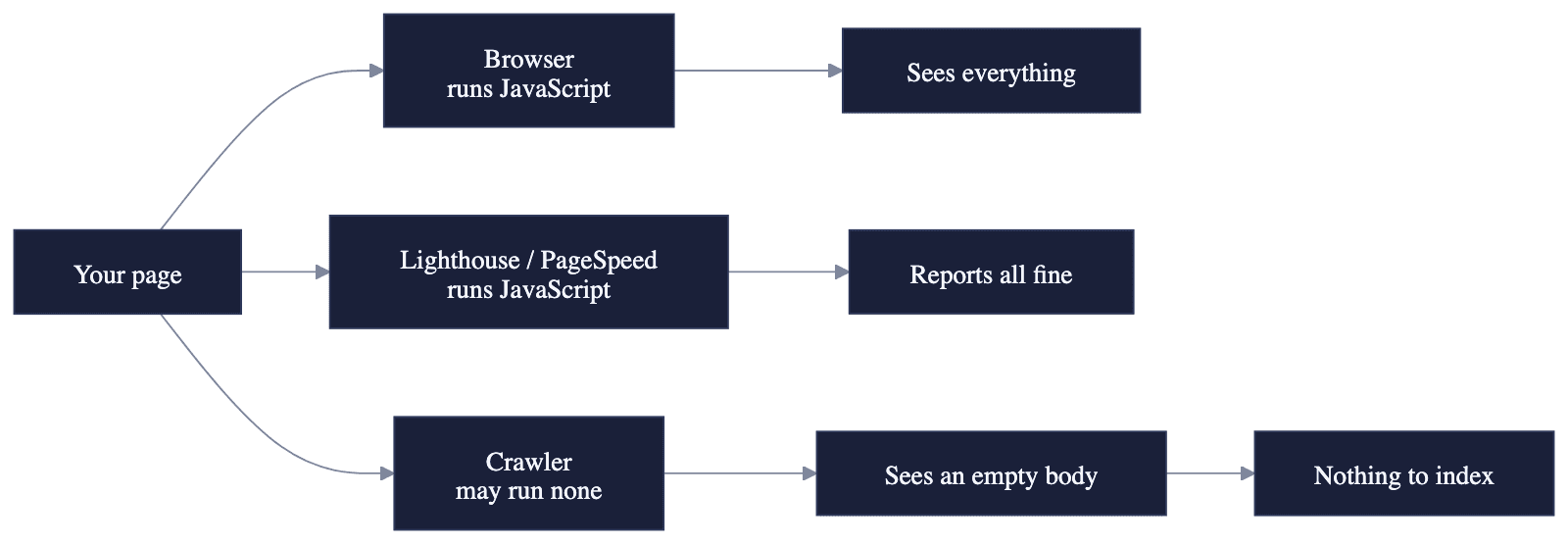
Lighthouse and PageSpeed Insights execute JavaScript when they test. So does your browser. So does almost every SEO tool with a preview feature. They all render the page the way a human visitor's browser would — which means they all see your content, and they all output that everything is fine.
The systems you actually need are less generous. Some crawlers render JavaScript, some do it on a delay, and several of the AI answer engines do little or none. A page that only exists after hydration is a page that partially exists, and the tools in your dashboard are structurally incapable of showing you which parts are missing.
A clinic that rebuilt its site on a no-code platform in 2026 documented this precisely: organic traffic fell off a cliff, every dashboard stayed green, and every crawler they tested saw a page with no headline, almost no text and no links at all. Their conclusion is the sentence to remember — don't trust the dashboard or the Lighthouse score; verify with curl and a spoofed bot user-agent directly (Bubble forum, August 2026).
Two ways we shipped this ourselves, four hours apart
We are Unifounder, a platform where AI tools do real startup execution work for solo founders. We built this blog in August 2026 and shipped it empty twice in one day. PROVEN — both are in our public commit history.
The first failure. The blog read its posts from markdown files on disk when a page was requested. Those files never reached the deployed serverless function. The code that read them caught the error and returned an empty list, so the site rendered a perfectly healthy listing page saying "No posts yet." Everything else worked — the layout, the RSS feed, the structured data, all correct, all describing a blog with nothing in it.
The second failure, four hours later. We removed the filesystem read entirely and compiled the posts into the build instead. It shipped empty again. The cause: our deployment ignore file contained a rule excluding every *.md file — a sensible rule written long before this blog existed, when the only markdown in the repository was documentation. Our posts are markdown. They were stripped out before the build even started.
Every local build was flawless throughout, because on a laptop the files are simply there.
Two completely different mechanisms. One identical symptom. A blog that looked entirely fine and contained nothing.
What we changed is the part worth stealing: our build now fails when the content directory is missing, instead of publishing an empty site. "No posts yet" and "the posts never arrived" used to render identically. They no longer can.
The four failure modes, in the order worth checking
1. Client-side rendering. Your content is assembled by JavaScript in the visitor's browser. Fix: server-render or statically generate the pages that matter. On most AI builders this is a platform setting or a platform limitation — find out which before you write another word.
2. Content that never reached the deployment. Files present in your project, absent from what actually got deployed. Ignore rules, build filters and bundling settings all do this quietly. Fix: check the deployed output, not your project folder.
3. Blocked in robots.txt. Fetch yoursite.com/robots.txt and read it. A Disallow: / left over from a staging configuration is more common than anyone admits — and if you want to appear in AI answers, check that GPTBot, ClaudeBot, PerplexityBot and Google-Extended are not blocked either.
4. Redirected before the content loads. Authentication middleware that sends unrecognised paths to a login page will do this to a crawler while leaving your logged-in browser session untouched. This is why the curl check matters: it arrives with no cookies, exactly like a crawler.
The habit worth forming
Run the curl check every time you add a new section to your site — a blog, a docs area, a landing page — and after any deploy that changes how pages are built.
It costs a minute. The alternative is what happened to us: perfect dashboards, clean deploys, and a month of wondering why the numbers never moved.
If the check comes back clean and your pages still show no impressions, that is a different problem with a different answer — we wrote it up here.
Building alone and unsure whether your site is actually reaching anyone? That uncertainty is the problem Unifounder exists to remove.